
Download VidMate APK Latest Version for Android
Download the VidMate APK and follow a simple Android installation process. Check device compatibility, free storage and permissions before completing the setup.
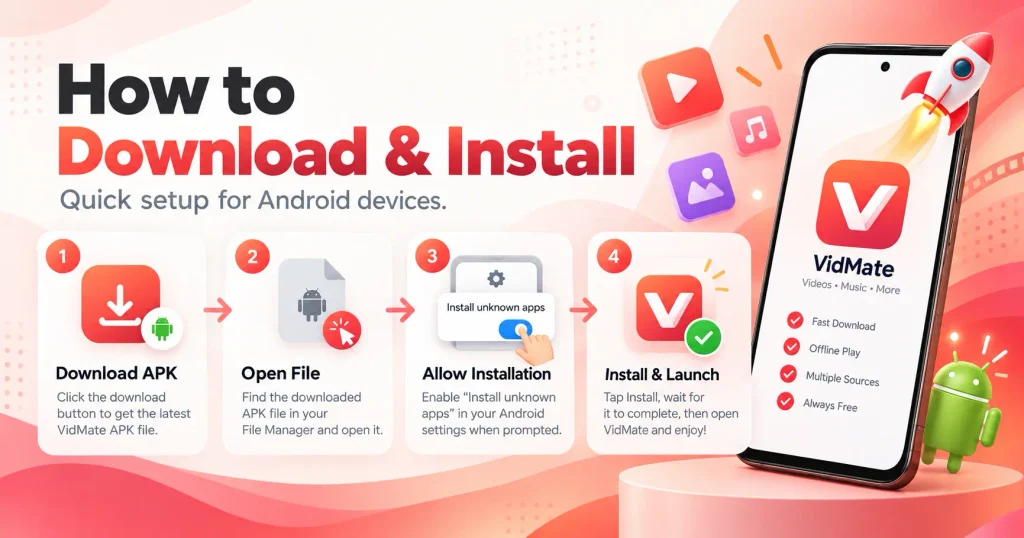
Download APKSave the VidMate APK file to your Android device.
Locate the downloaded package in your Downloads folder.
Grant installation permission only if you trust the file source.
Finish installation and open VidMate from your app drawer.
VidMate APK
VidMate APK Download gives Android users access to supported video, music, and offline media features through a single application. Users can choose available video quality, save supported audio, manage downloads, and access successfully downloaded files later. Before installation, check your Android version, available storage, and the source of the APK file. This may include compatibility improvements, interface updates, and download-management changes.
VidMate APK Information
| App Details | Information |
|---|---|
| App Name | VidMate |
| Platform | Android |
| Package Type | APK |
| Category | Video & Music Downloader |
| Latest Version | Check current release |
| File Size | Varies by version |
| Video Quality | SD, HD, Full HD, 4K where supported |
| Audio Support | MP3 and compatible formats |
| Installation | Manual APK installation |
Download VidMate
Since it may be distributed outside Google Play, users normally install it through an APK file. Before downloading, use a stable internet connection and make sure enough storage is available for the app and future media files.
Avoid suspicious redirects, modified packages, or unexpected duplicate APK files. Use a source you trust and review the file details before installation.
How to Install VidMate APK
Follow these steps:
VidMate for Android
The VidMate video downloader offers different quality and format options for supported media. Lower-resolution files can save storage and mobile data, while 720p or 1080p may provide better picture quality on larger screens.
Users who only need audio may be able to select MP3 or another supported audio format. Downloaded media can normally be managed through the app’s download section or Android storage.
VidMate for iOS
APK cannot be installed directly on iPhones or iPads because iOS does not support Android APK files. Users should avoid websites claiming that an Android APK can be installed directly on an iPhone. Instead, use trusted iOS applications that provide similar offline-media functions.
VidMate for Windows PC
Users searching for for PC may run a compatible Android version through an Android emulator. This creates an Android environment on a Windows computer, but it should not be confused with an official native Windows version.
Common Installation Problems
APK Not Installing
Check your Android version, available storage, and whether the file downloaded completely.
Installation Blocked
Allow installation from the browser or file manager only if you trust the APK source.
Downloads Stop Working
Check your internet connection, free storage, and Android background restrictions before reinstalling the app.